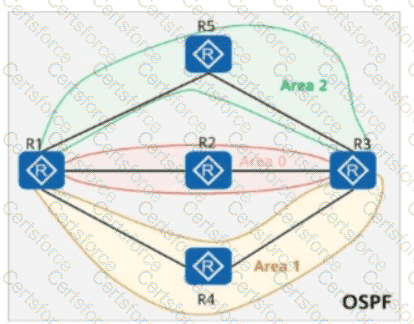
???? Topology Key Points:
Area 1 is an NSSA (Not-So-Stubby Area).
R4 is injecting an external route: 10.0.4.4/32.
The command asbr-summary 10.0.4.0 255.255.255.0 is applied on R1 and R3, which are ABRs connected to the NSSA.
???? Behavior of asbr-summary in Huawei OSPF:
The asbr-summary command summarizes external routes from an ASBR into an area.
It causes the ABR to generate a summary LSA (Type-3) for the summary prefix instead of the more specific original routes.
As a result, routers in other areas receive only the summary (e.g., 10.0.4.0/24), not the original more-specific route (10.0.4.4/32).
???? What Happens in Each Router:
✅ R4 originates route 10.0.4.4/32 as an NSSA Type-7 LSA.
✅ R1, as an ABR, translates the Type-7 LSA to Type-5 and applies the asbr-summary, advertising 10.0.4.0/24 into Area 0.
✅ R3, another ABR, learns the summarized route and advertises 10.0.4.0/24 into Area 2.
✅ R3 will NOT contain 10.0.4.4/32, only the summarized 10.0.4.0/24.
✅ Final Answer: C. The routing table of R3 contains the route 10.0.4.0/24.
Official Huawei Extract:
" When a summary route is configured using the asbr-summary command, the ABR or ASBR advertises the summary route into other areas instead of advertising specific routes. This helps reduce the size of the LSDB and routing table in large-scale networks. "
— [Huawei HCIA-Datacom Certification Guide – OSPF Route Summarization & NSSA Behavior]


Submit