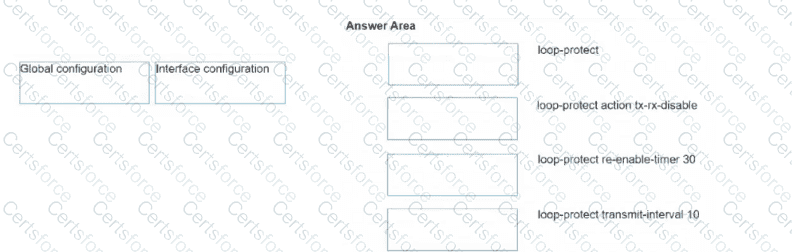
Interface configuration: loop-protect
Global configuration: loop-protect action tx-rx-disable
Global configuration: loop-protect re-enable-timer 30
Global configuration: loop-protect transmit-interval 10
In the AOS-CX operating system, configuration for Loop Protection follows a " Global Parameter, Local Execution " model. This distinguishes it from STP, which often has more per-interface tunable parameters.
Enabling the Feature (Interface configuration): The command loop-protect is entered within the interface context (e.g., interface 1/1/1). This command acts as a " trigger " or toggle that tells the switch to start sending and listening for loop-protection probe packets on that specific physical port or LAG.
Defining the Behavior (Global configuration): The specific way the loop protection " engine " behaves is defined once for the entire switch in the global configuration context.
loop-protect action tx-rx-disable: This sets the universal response if a loop is detected. The switch can be told to simply log the event, or physically disable the port (either just the transmitter, or both transmitter and receiver).
loop-protect re-enable-timer 30: If a port is disabled due to a loop, this global timer defines how many seconds the switch waits before automatically attempting to bring the port back online to see if the loop has been physically removed.
loop-protect transmit-interval 10: This defines how frequently the switch generates the proprietary loop protection packets.
Why this structure exists: This model simplifies administration. You can change the sensitivity (interval) or the severity (action) for the entire switch in one place, while still having the granular control to only enable the feature on " risky " ports where unmanaged switches or hubs might be connected.



Submit