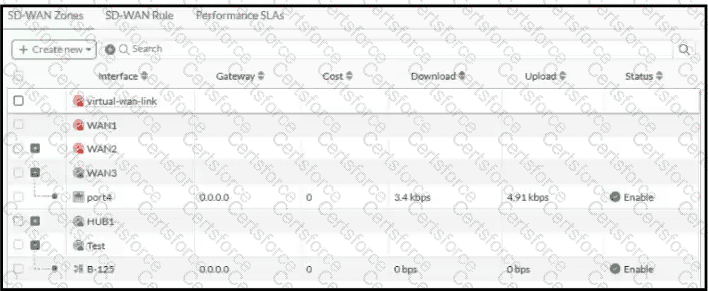
FortiGate SD-WAN zones are logical containers that group interfaces for traffic steering, route selection, and security-policy enforcement. The exhibit distinguishes zones from their underlying SD-WAN members through a hierarchical display.
Option C is correct. WAN1 is an empty, user-created zone and can be deleted because it has no SD-WAN member associations. The other zones must be evaluated according to their membership and whether they are system-defined.
WAN2 has an expansion indicator, showing that the zone contains member entries even though those entries are currently collapsed. Consequently, option A is incorrect: the absence of visible subordinate interfaces does not prove that a zone has no members.
HUB1 also has an expansion indicator. Its members are hidden by the collapsed view, so option D is incorrect.
The red icon is not a universal deletion indicator. In particular, the built-in virtual-wan-link zone must not be treated as an ordinary removable custom zone. An administrator must distinguish interface or zone operational status from configuration eligibility for deletion.
Before removing a custom zone, its members and any references in firewall policies or SD-WAN rules must be examined.
[References: FortiOS 7.6 Administration Guide — SD-WAN Zones, SD-WAN Members and SD-WAN Configuration., ==========, ]
Contribute your Thoughts:
Chosen Answer:
This is a voting comment (?). You can switch to a simple comment. It is better to Upvote an existing comment if you don't have anything to add.


Submit