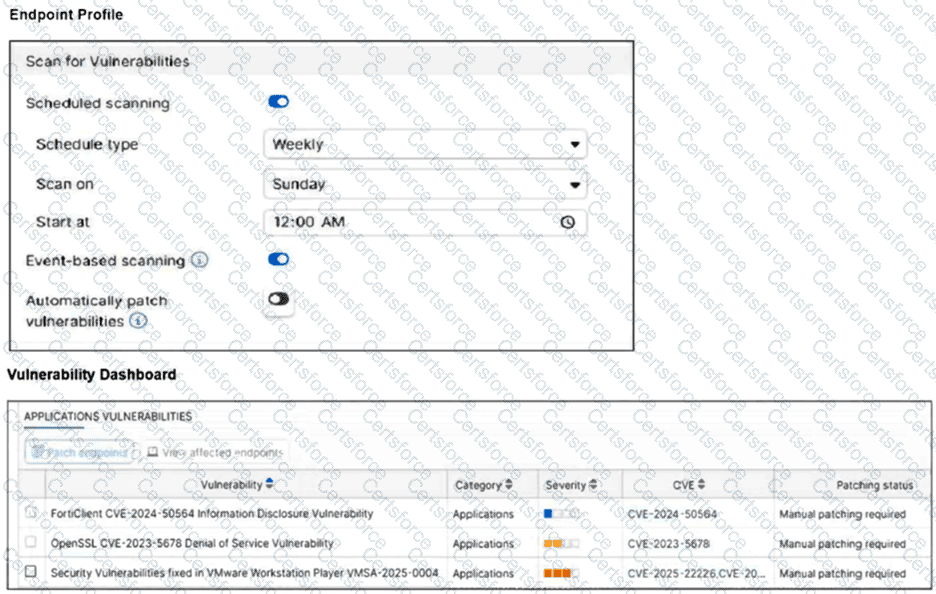
Based on the settings shown in the provided exhibits, the vulnerability remediation workflow is determined by the Endpoint Profile and the Vulnerability Dashboard .
Endpoint Profile Evaluation: The top exhibit displays the Scan for Vulnerabilities settings. The toggle for Automatically patch vulnerabilities is explicitly set to Disabled . Consequently, the system will not perform automated remediation when a scan completes.
Manual Patching Requirement: The Vulnerability Dashboard (bottom exhibit) lists several application vulnerabilities with a Patching status of Manual patching required . In a FortiSASE environment, " Manual " indicates that the vulnerability cannot be handled by the client ' s autonomous update process and requires a direct instruction from the management plane.
Administrative Intervention: The dashboard includes a Patch endpoints action button. Since auto-patching is disabled in the profile, an administrator must manually select the vulnerabilities and click the " Patch endpoints " button to remotely trigger the patching sequence on the managed endpoints via the FortiSASE cloud service.
Workflow Logic: While FortiClient acts as the " conductor " on the local machine to facilitate the download and installation, the trigger for this specific scenario is the administrator ' s remote action within the portal. This differentiates it from Option D (which is disabled) and Option C (which would involve a user manually browsing a website outside the managed SASE workflow).
Contribute your Thoughts:
Chosen Answer:
This is a voting comment (?). You can switch to a simple comment. It is better to Upvote an existing comment if you don't have anything to add.


Submit