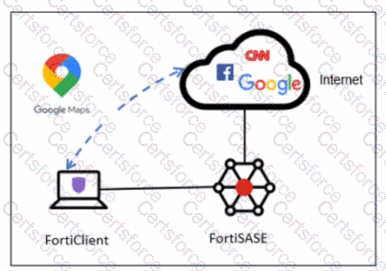
FortiSASE Geofencing and Regional Compliance allow administrators to control where remote users connect based on their physical location, which is determined by the endpoint's public IP address.3
Default Connection Behavior: By default, FortiSASE uses a "best-effort" geolocation logic to ensure the lowest latency for the user. If an administrator has not configured a specific regional compliance rule for a user's country or region, FortiClient will automatically attempt to connect to the closest available FortiSASE security PoP (Point of Presence) based on proximity.4
Regional Compliance Rules: When an organization must enforce data residency or specific security routing requirements, they create Regional Compliance rules. According to the FortiSASE 25 Feature Administration Guide, these rules allow the administrator to override the default "closest PoP" behavior for specific countries.
Connectivity Options: Within a regional compliance rule, the administrator must specify the destination for the traffic. The system provides a choice between two distinct connection types: a FortiSASE Security PoP or an On-premises device (such as a FortiGate acting as a gateway).5 The documentation specifies that a rule is designed to point to one of these types at a time to satisfy the compliance requirement for that specific region.
Connection Priority: While multiple connections can be managed in a priority table, the logic for Regional Compliance is focused on directing the user to the designated compliant entry point. Option D is incorrect because the connection order is determined by the Priority and custom fail-over connections table; an administrator can manually adjust the sequence, so it is not "always" the security PoP first.
Contribute your Thoughts:
Chosen Answer:
This is a voting comment (?). You can switch to a simple comment. It is better to Upvote an existing comment if you don't have anything to add.
Submit