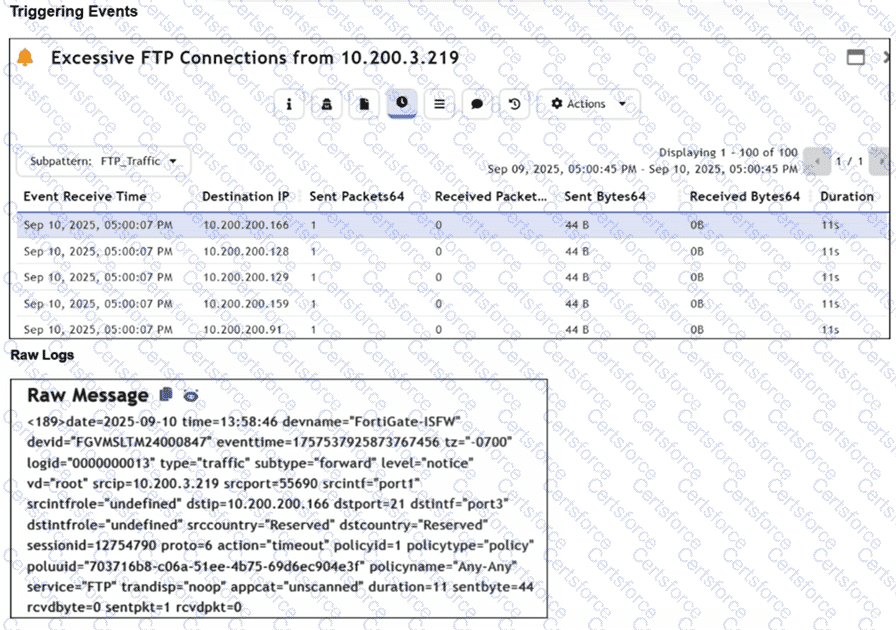
Based on the analysis of the Triggering Events and the Raw Message provided in the FortiSIEM 7.3 interface:
Active Reconnaissance (A): The " Triggering Events " table shows a single source IP (10.200.3.219) attempting to connect to multiple different destination IP addresses (10.200.200.166, .128, .129, .159, .91) on the same service (FTP/Port 21). Each attempt consists of exactly 1 Sent Packet and 0 Received Packets. This pattern of " one-to-many " sequential connection attempts is the signature of a horizontal port scan, which is a primary technique in Active Reconnaissance.
Destination hosts are not responding (C): The Raw Log shows the action as " timeout " and specifically lists " sentpkt=1 rcvdpkt=0 " . In FortiGate log logic (which FortiSIEM parses), a " timeout " with zero received packets indicates that the firewall allowed the packet out (Action was not ' deny ' ), but no SYN-ACK or response was received from the target host within the session timeout period. This confirms the destination hosts are either offline, non-existent, or silently dropping the traffic.
Why other options are incorrect:
FortiGate is not routing (B): If the FortiGate were not routing the packets, the logs would typically not show a successful session initialization ending in a " timeout, " or they would show a routing error/deny. The fact that 44 bytes were sent indicates the FortiGate processed and attempted to forward the traffic.
FortiGate is blocking return flows (D): If the return flow were being blocked by a security policy on the FortiGate, the action would typically be logged as " deny " for the return traffic, and the session state would reflect a policy violation rather than a generic session " timeout " .


Submit