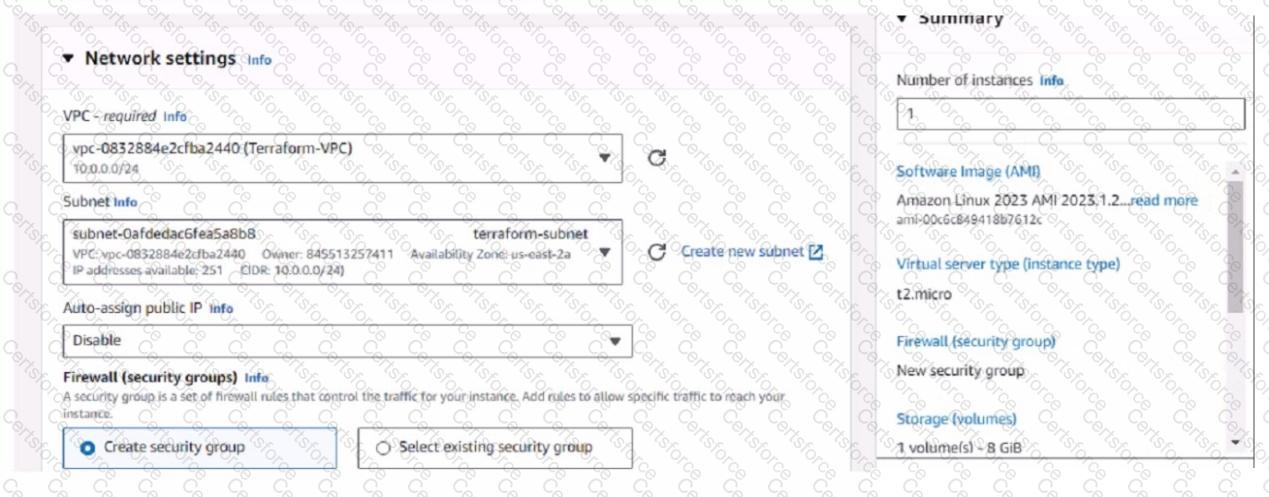
The next step the administrator must take to access the Linux EC2 instance from the internet is:
D. Allocate an Elastic IP address and assign it to the instance.
Elastic IP (EIP) Requirement: By default, when an EC2 instance is launched in AWS, it receives a public IP address from Amazon's pool, which is not static. This IP address can change, for example, if the instance is stopped and started again. To have a static IP address, you need to allocate an Elastic IP (EIP), which is a persistent public IP address, and then associate it with the instance.
Public Accessibility: Without an Elastic IP, the instance may not be accessible over the internet after a reboot or stop/start sequence. Assigning an Elastic IP ensures the instance can be accessed consistently using the same IP address.
References: The AWS documentation on EC2 instances details the process and need for Elastic IPs to ensure consistent internet access to instances.
Contribute your Thoughts:
Chosen Answer:
This is a voting comment (?). You can switch to a simple comment. It is better to Upvote an existing comment if you don't have anything to add.


Submit