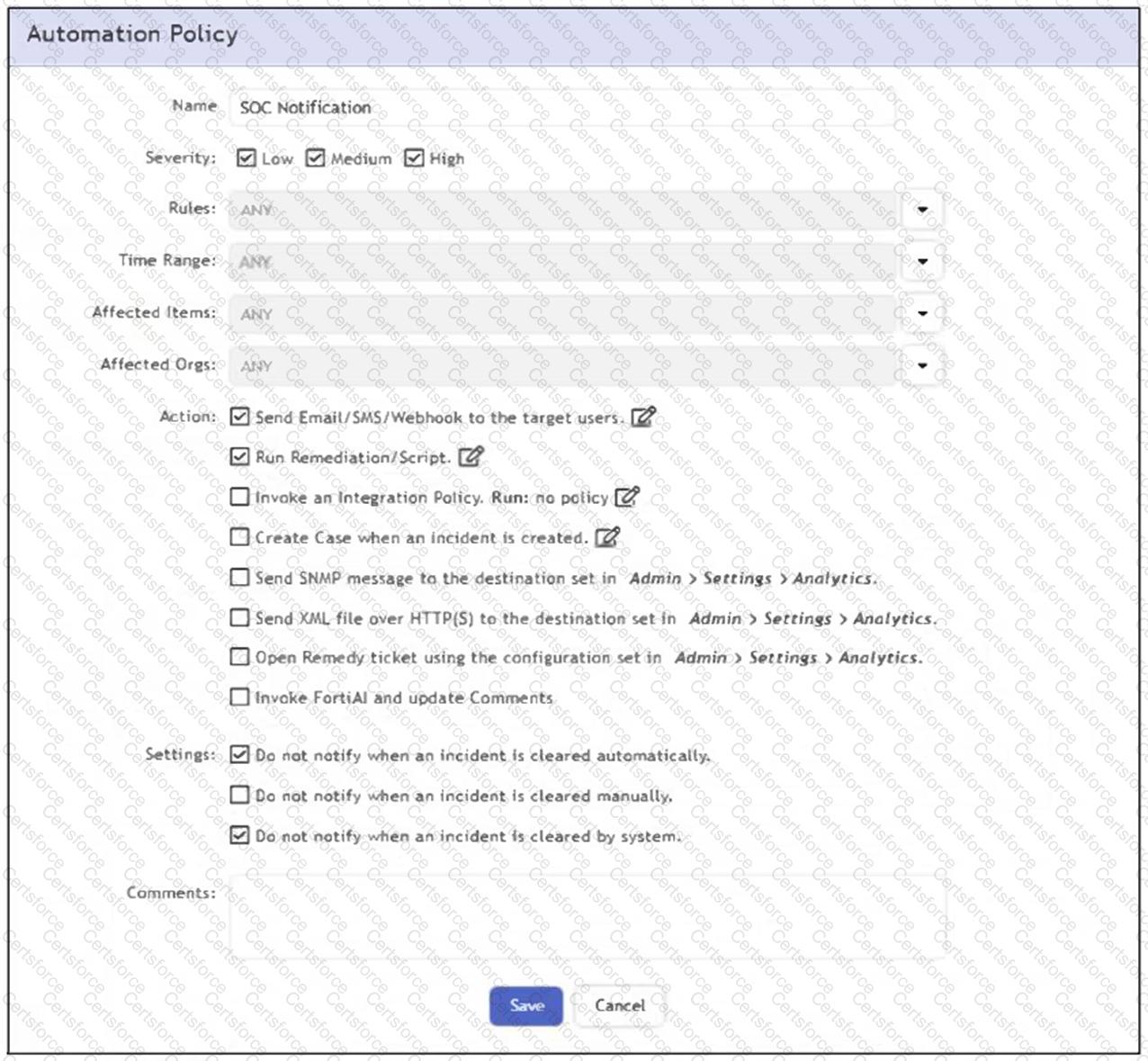
The correct answer is B because the automation policy shown has the email/SMS/webhook notification action enabled, and the setting that suppresses notification for manual incident clearing is not selected. The FortiSIEM Study Guide explains that automation policies define actions taken when incident-related policy criteria match. It states that notification policies are defined by criteria such as severity, associated rules, time range, affected items, and actions. The guide also states that FortiSIEM can send email notifications and SMS messages to individuals or groups as part of an automation policy. In the exhibit, the options Do not notify when an incident is cleared automatically and Do not notify when an incident is cleared by system are selected, but Do not notify when an incident is cleared manually is not selected. Because the analyst clears the incident manually, the suppression condition does not apply. Therefore, FortiSIEM sends the configured email notification to the target user, identified in the question as the SOC manager.
Contribute your Thoughts:
Chosen Answer:
This is a voting comment (?). You can switch to a simple comment. It is better to Upvote an existing comment if you don't have anything to add.


Submit