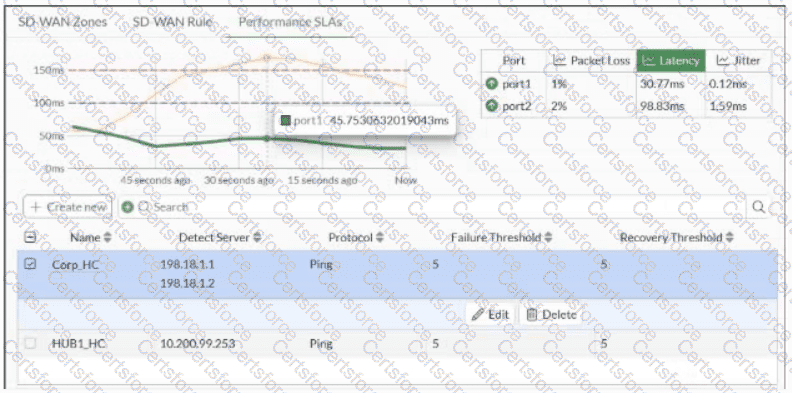
Over the past 60 seconds, the member port2 latency was temporarily above the latency criteria defined for HUB1_HC.
B.
The administrator configured the Corp_HC performance service-level agreement (SLA) with SLA targets for the three criteria: packet loss, latency, and jitter.
C.
Over the past 60 seconds, the member port1 was monitored healthy for both latency criteria of the Corp_HC definition.
D.
The administrator configured the packet loss threshold for Corp_HC and HUB1_HC to 5%.
The selected performance SLA in the exhibit is Corp_HC , and the Latency view shows two configured latency criteria as horizontal threshold lines. Throughout the displayed 60-second interval, the green port1 latency remains below both thresholds, so port1 remains healthy against both Corp_HC latency criteria. Fortinet explains that the FortiGate GUI displays measured member performance and highlights when a member fails a configured SLA target; configured latency values can therefore be compared directly with measured latency. SD-WAN_7.6_Enterprise_Administr… Option A incorrectly associates the graph with HUB1_HC when Corp_HC is selected. Option B cannot be inferred merely because packet loss, latency, and jitter metrics are displayed; those metrics can be measured without all three being configured as SLA targets. Option D confuses the displayed failure/recovery threshold values of 5 with a 5% packet-loss SLA threshold .
================
Contribute your Thoughts:
Chosen Answer:
This is a voting comment (?). You can switch to a simple comment. It is better to Upvote an existing comment if you don't have anything to add.


Submit