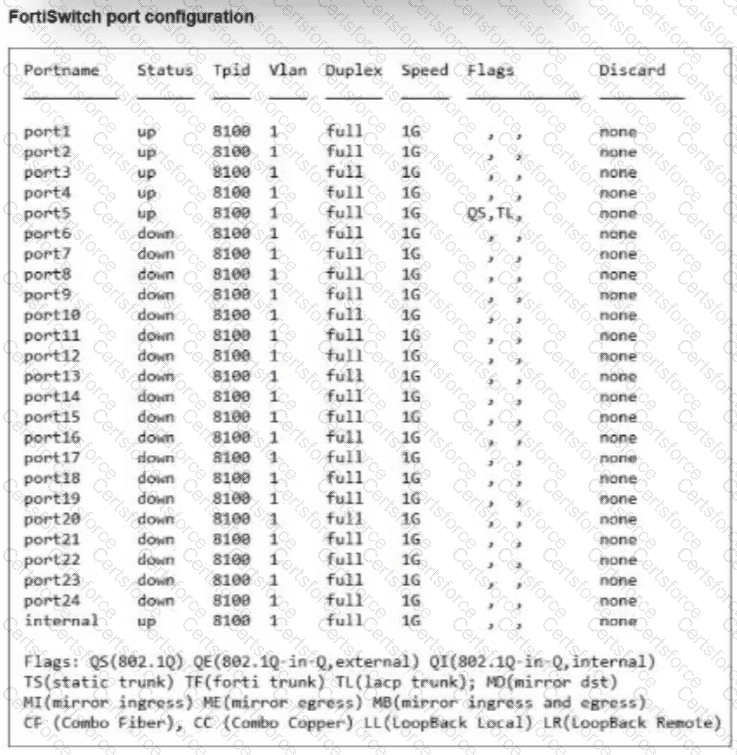
According to the FortiSwitchOS 7.6 Administration Guide and the FortiSwitch 7.6 Study Guide , the diagnose switch physical-ports summary command provides an overview of physical interface states, VLAN memberships, duplex/speed parameters, and port encapsulation flags.
When a FortiSwitch operates in managed mode via FortiLink, two distinct characteristics appear in this command output:
Management VLAN Assignment: The FortiLink control plane automatically establishes a dedicated management VLAN—by default, VLAN 4094 —and assigns it to the internal discovery interfaces and uplinks.
Encapsulation Flags: Interfaces participating in the FortiLink fabric or Inter-Switch Links (ISLs) are assigned the TF (Forti Trunk) flag to indicate proprietary FortiLink management framing.
In the provided exhibit, every single interface (from port1 through port24, as well as the virtual internal interface) is assigned to default Vlan 1 . Furthermore, looking at the Flags column, port5 has QS (standard 802.1Q) and TL (standard LACP trunk), but no TF (Forti Trunk) flag is present on any interface. The absence of VLAN 4094, the complete absence of the TF flag, and the presence of the default factory VLAN 1 mapping confirm that this device is operating in standalone mode (Option C) .
Regarding the incorrect options: Option A is incorrect because port5 is bundled into a standard LACP 802.1Q trunk (QS, TL), not configured purely as an access port. Option B is incorrect because this output reflects Layer 2 switchport properties rather than Layer 3 routing interfaces. Option D is incorrect because managed mode would display FortiLink-specific VLANs and TF trunk flags.


Submit