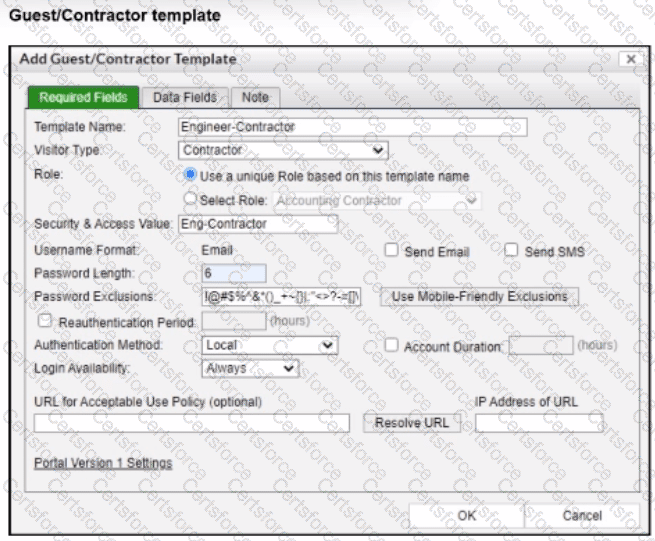
The correct answer is A . In the exhibit, the Template Name is Engineer-Contractor , and the selected Role option is Use a unique Role based on this template name . That means FortiNAC-F uses the template name itself as the role value for any account created from this guest/contractor template. The study guide confirms this behavior: by default, the Role field is populated with the template name, although the administrator can alternatively select from an existing role list. It also states that the role value in the guest and contractor template populates the Role field of any account created from that template.
Option B , Eng-Contractor , is wrong because that value is entered in the Security and Access Value field, not the Role field. That value can still be used in user/host profiles or policies, but it does not populate the account Role field. Option C , Contractor , is only the Visitor Type , which controls the kind of guest/contractor account and associated icon behavior. Option D , Accounting Contractor , is visible in the disabled Select Role dropdown, but that option is not selected because the template is configured to use a unique role based on the template name.
Contribute your Thoughts:
Chosen Answer:
This is a voting comment (?). You can switch to a simple comment. It is better to Upvote an existing comment if you don't have anything to add.


Submit