Exact Extract — Official Administration Guide
FortiOS 8.0.0 Administration Guide | Security Fabric object synchronization | p. 4754
“set fabric-object-unification {default | local} set configuration-sync {default | local} set fabric-workers < integer > end”
Technical Deep Dive
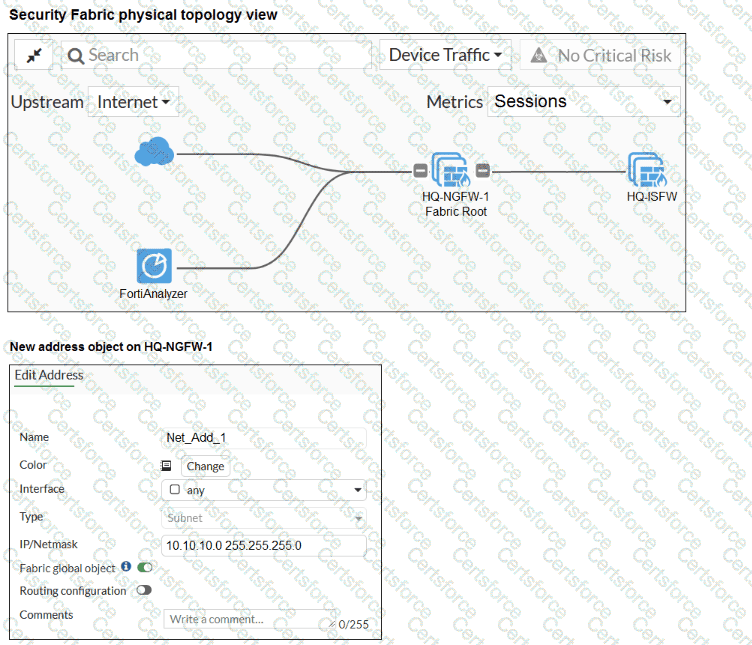
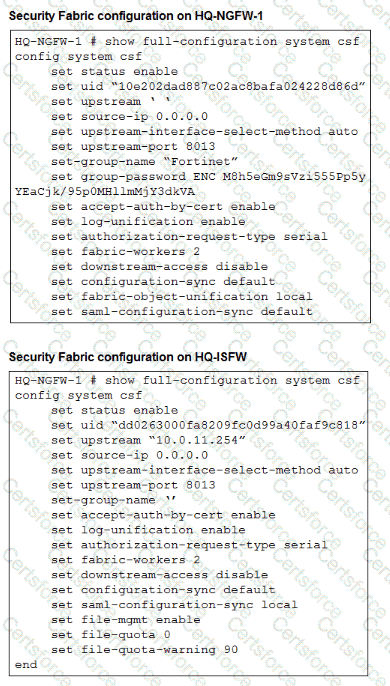
The technical guidance text surfaced from the PDF did not return a matching paragraph for fabric-object-unification, but the exhibit itself shows these critical details:
On HQ-NGFW-1, set configuration-sync default and set fabric-object-unification local
On HQ-ISFW, set configuration-sync default
The new address object on HQ-NGFW-1 has Fabric global object enabled
Those exhibit settings indicate that the object is intended to be a fabric-wide object, but the root FortiGate is currently configured with fabric-object-unification local, which prevents that object from being unified across the fabric.
Here is the key logic:
The address object was created on the root FortiGate with Fabric global object enabled.
Normal configuration sync is already set to default, so this is not a generic sync-disabled problem.
The root device is specifically configured with set fabric-object-unification local.
That setting keeps fabric objects local to the device rather than unifying them across downstream fabric members.
Therefore, to make the object propagate as a shared Security Fabric object, the administrator must change the root setting to:
config system csf
set fabric-object-unification default
Why the other options are wrong:
A is wrong because the downstream device already has configuration-sync default, and changing it to local would make synchronization more restrictive, not less.
B is wrong because saml-configuration-sync is unrelated to firewall address object synchronization.
D is wrong because downstream-access controls downstream management access behavior, not fabric object propagation.
FortiOS 8.0 verification note: Fabric-wide address synchronization requires fabric-object enabled and proper root unification.


Submit