Exact Extract — Official Administration Guide
FortiOS 8.0.0 Administration Guide | FQDN static routing | p. 615
“In the GUI, to add an FQDN firewall address to a static route in the firewall address configuration, enable the Static Route Configuration option. Then, when you configure the static route, set Destination to Named Address.”
Technical Deep Dive
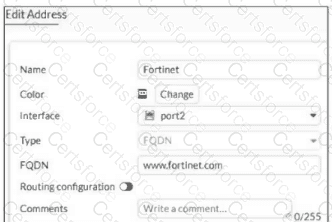
The correct answer is D. The exhibit shows an FQDN address object (www.fortinet.com), but Routing configuration is disabled. FortiGate does not make that object available as a selectable destination for named static routes until this option is enabled.
Why the others are wrong:
A is incomplete. Even if the static route uses Named Address, the object still will not appear unless Routing configuration is enabled on the address object.
B is not the first requirement from the documented FortiOS behavior. DNS resolution matters operationally for FQDN objects, but the documented reason it does not appear in the drop-down is the missing Routing configuration setting.
C is unrelated. The interface does not have to be set to port2 first just to make the address object selectable.
In practice, the fix is:
config firewall address
set type fqdn
set fqdn " www.fortinet.com "
set allow-routing enable
After that, the object becomes available in the static route Destination field when using a named address.
FortiOS 8.0 verification note: The address object needs allow-routing before selection as a Named Address route.


Submit