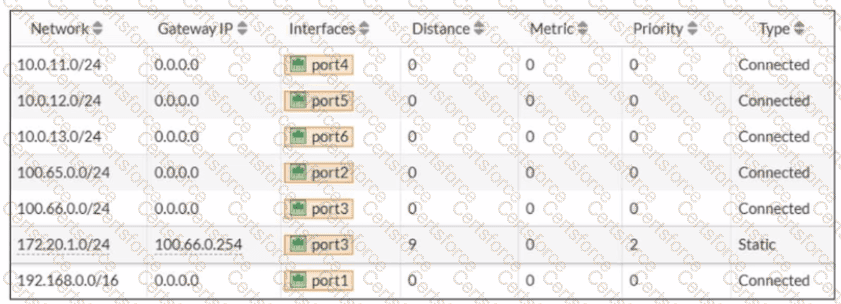
From the routing table in the exhibit, there is already a static route for 172.20.1.0/24 pointing out port3 with:
Distance = 9
Priority = 2
Type = Static
In FortiOS, route selection prefers (in order) the route with the lowest administrative distance to a destination. Therefore, to make traffic to 172.20.1.0/24 go through port2 only, the administrator must ensure the port2 static route is more preferred than the existing port3 route.
Why C is correct
C. The existing static route through port3 must have the distance set to 11.
If the existing port3 route distance is increased to 11, then a new port2 route with distance 9 will be preferred (9 < 11). This makes the port3 route a backup route instead of the active one.
Why D is correct
D. The new static route must have the distance set to 9
Setting the new port2 route distance to 9 (and increasing the port3 route to 11 as in option C) ensures FortiGate selects the port2 route as the best route for 172.20.1.0/24.
Why A and B are not correct
A (priority 3): By itself it does not guarantee selection over the existing route, and FortiOS route choice is driven primarily by distance.
B (metric 1): Metric is not the primary selector for static route preference compared to administrative distance in this scenario.
So the two criteria that achieve the objective are:
Make the existing port3 route less preferred by increasing its distance (C)
Ensure the new port2 route uses the preferred distance (D)


Submit