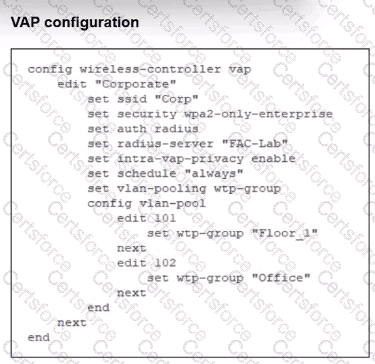
Analysis of the VAP Configuration (Image 1): The VAP named " Corporate " has set vlan-pooling wtp-group, which maps directly to the Managed AP Group VLAN pooling method. The study guide states: " The Managed AP Group load balance method assigns VLANs from pools based on AP location. " This means VLAN assignment is NOT load-balanced (no round-robin or hash) — instead, it is determined by which WTP (Wireless Termination Point) group the AP physically belongs to:
APs in wtp-group " Floor_1 " → assigned VLAN 101 (Corp.101)
APs in wtp-group " Office " → assigned VLAN 102 (Corp.102)
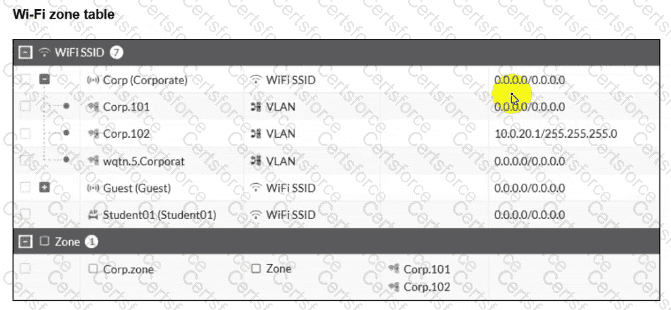
Why C is CORRECT: From Image 2, the interface Corp.101 (VLAN 101 — assigned to the Floor_1 AP group) shows an IP address of 0.0.0.0/0.0.0.0, meaning no IP address or DHCP server is configured on that interface. Therefore, clients connecting to APs in the Floor_1 group will be placed on VLAN 101 but will not be able to obtain an IP address — confirming option C.
Why D is CORRECT: The VAP configuration explicitly maps wtp-group " Office " to VLAN 102. The study guide confirms that with the Managed AP Group method, VLANs are assigned based on AP group membership. APs belonging to the " Office " group will have all their clients assigned to VLAN 102 (Corp.102), which has a configured IP of 10.0.20.1/255.255.255.0 — confirming option D.
Why the other options are wrong:
A is incorrect — The wtp-group pooling method does not load balance; it assigns VLANs based on AP group location. Round-robin or hash would be needed for load balancing. Additionally, the subnet 10.0.3.0/24 does not exist anywhere in either exhibit.
B is incorrect — Corp.zone contains both Corp.101 and Corp.102. Since Corp.101 has no IP configured (0.0.0.0/0.0.0.0), clients on Floor_1 APs (VLAN 101) will not receive any IP address, let alone one from the 10.0.20.0/24 subnet. Only Corp.102 clients (Office group) receive addresses from 10.0.20.0/24.


Submit