A FortiMail device is integrated with a FortiSandbox device. What is the expected behavior on FortiMail for emails that require FortiSandbox inspection? (Choose one answer)
A.
FortiMail will queue emails for up to 5 minutes during URL rating errors before submitting URLs to FortiSandbox
B.
FortiMail will queue emails for up to 30 minutes to allow FortiSandbox to finish scanning all attachments and URLs.
C.
FortiMail will not send attachments and URLs to FortiSandbox if their rating exists in the local cache.
D.
FortiMail will deliver all emails to the destination after the emails pass all local security checks.
From the FortiMail Integration lesson, the Study Guide explicitly states:
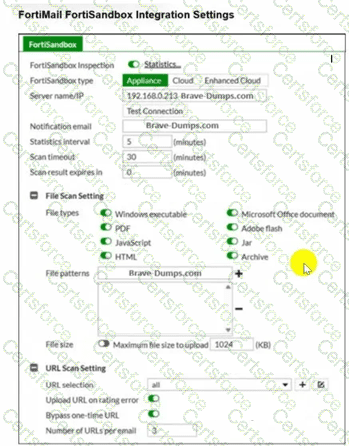
"The Scan timeout value determines how long FortiMail will wait for a response from FortiSandbox. The default is 30 minutes. So, if after 30 minutes FortiSandbox is unable to generate a verdict, FortiMail will release the email to the end user."
"SMTP is a store-and-forward protocol. This allows FortiMail to queue the email while FortiSandbox inspects all submitted samples. FortiMail will release the email only if there is a scan timeout event, or FortiSandbox returns a clean verdict."
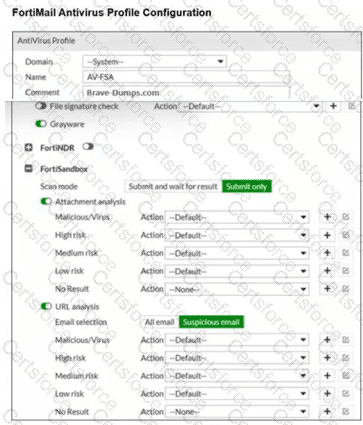
The Integration Settings exhibit clearly confirms Scan timeout = 30 minutes , and the AV Profile shows both Attachment analysis and URL analysis are enabled — meaning FortiMail will hold/queue emails for up to 30 minutes while FortiSandbox completes inspection of all attachments and URLs before taking action.
Contribute your Thoughts:
Chosen Answer:
This is a voting comment (?). You can switch to a simple comment. It is better to Upvote an existing comment if you don't have anything to add.


Submit