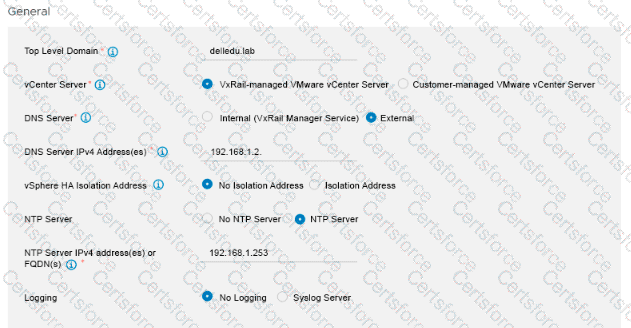
The exhibit illustrates the "General" settings section within the VxRail Deployment Wizard, where foundational infrastructure parameters are defined. Crucially, the radio button for "VxRail-managed VMware vCenter Server" is explicitly selected. In a VxRail deployment topology, choosing an internal, VxRail-managed vCenter server fundamentally changes how lifecycle management (LCM) operations are orchestrated for the cluster.
When a cluster is deployed with a VxRail-managed vCenter, the vCenter Server virtual appliance is tightly coupled with the VxRail Manager platform. This deep architectural integration guarantees that all future patch cycles, security definitions, and major platform upgrades for the vCenter Server are natively included within the unified VxRail composite update bundles. When an administrator applies an update package through the VxRail Manager dashboard, the orchestration engine automatically conducts pre-checks and applies the software versions to both the VxRail Manager and the vCenter Server in a fully automated, validated sequence. Conversely, infrastructure services configured as "External," such as the designated DNS or NTP servers, reside outside the VxRail ecosystem and are not targeted by VxRail lifecycle payloads. Therefore, the vCenter Server is the specific component captured in future update packages.
[References: Dell VxRail Deploy Study Guide; VxRail Deployment Wizard Configurations; Lifecycle Management and Component Bundles., , ]
Contribute your Thoughts:
Chosen Answer:
This is a voting comment (?). You can switch to a simple comment. It is better to Upvote an existing comment if you don't have anything to add.


Submit