R2# configure terminal
R2(config)# interface Ethernet0/0
R2(config-if)# ip ospf priority 255
R2(config-if)# exit
R2(config)# interface Ethernet0/1
R2(config-if)# ip ospf priority 255
R2(config-if)# exit
R2(config)# router ospf 30
R2(config-router)# router-id 10.22.22.22
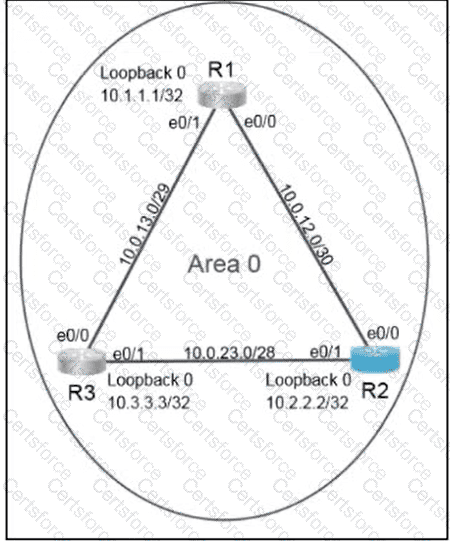
R2(config-router)# network 10.0.12.0 0.0.0.3 area 0
R2(config-router)# network 10.0.23.0 0.0.0.15 area 0
R2(config-router)# end
R2# copy running-config startup-config
Verification commands:
R2# show ip ospf neighbor
R2# show ip ospf interface Ethernet0/0
R2# show ip ospf interface Ethernet0/1
R2# show ip protocols
The router ospf 30 command creates the locally significant OSPF process requested by the task. The explicit router-id 10.22.22.22 command prevents R2 from dynamically selecting another active interface address as its router ID. The /30 network requires wildcard mask 0.0.0.3, while the /28 network requires 0.0.0.15; placing both prefixes in area 0 enables OSPF on R2’s links toward R1 and R3 and permits neighbor formation when the remaining OSPF parameters match.
The interface command ip ospf priority 255 gives R2 the maximum OSPF interface priority on both broadcast segments. This makes R2 the strongest DR candidate. OSPF DR elections are non-preemptive, so if a DR election has already completed, the election must be restarted by clearing the relevant OSPF processes or resetting the affected interfaces. Cisco documents that OSPF router IDs identify OSPF instances, while the DR and BDR reduce flooding on broadcast networks; OSPF process numbers do not have to match between neighboring routers.


Submit