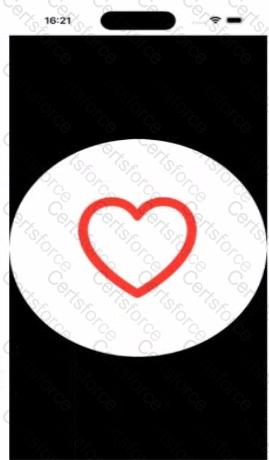
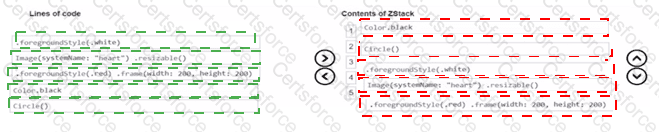
This question belongs to View Building with SwiftUI , specifically stacking views and applying modifiers. A ZStack layers views from back to front, so the first item becomes the background and later items appear on top. To match the screenshot, the black background must be the back layer, so Color.black goes first. The large white circle sits above that, so Circle() followed by .foregroundStyle(.white) comes next. Finally, the red heart image sits on top of the circle, so Image(systemName: " heart " ).resizable() followed by .foregroundStyle(.red).frame(width: 200, height: 200) must be last. SwiftUI’s Image.resizable() allows the symbol image to scale to the frame you apply, and foregroundStyle sets the visible color styling for the shape and symbol.
So the intended structure is:
ZStack {
Color.black
Circle()
.foregroundStyle(.white)
Image(systemName: " heart " ).resizable()
.foregroundStyle(.red)
.frame(width: 200, height: 200)
}
This produces a black background, a white circular shape, and a centered red heart on top, exactly as shown.
Contribute your Thoughts:
Chosen Answer:
This is a voting comment (?). You can switch to a simple comment. It is better to Upvote an existing comment if you don't have anything to add.




Submit