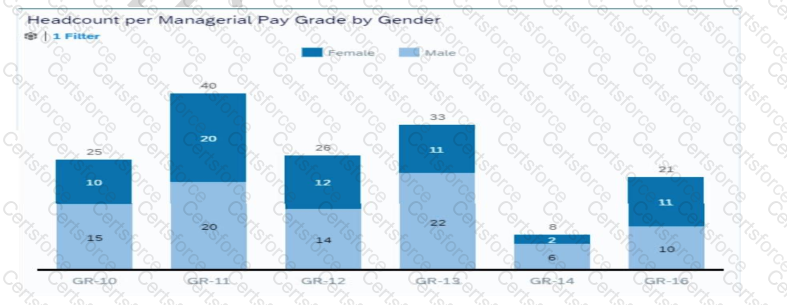
To configure the Builder to display the chart in the screenshot, you must:
Set Dimensions to Gender (B):
Gender defines the chart’s grouping, ensuring the breakdown is displayed across male and female categories.
Set Color to Gender (C):
Using color for Gender distinguishes male and female headcounts visually in the bar chart.
Set Measures to EOP Headcount (E):
EOP (End-of-Period) Headcount is the quantitative measure displayed for each pay grade.
Contribute your Thoughts:
Chosen Answer:
This is a voting comment (?). You can switch to a simple comment. It is better to Upvote an existing comment if you don't have anything to add.


Submit