
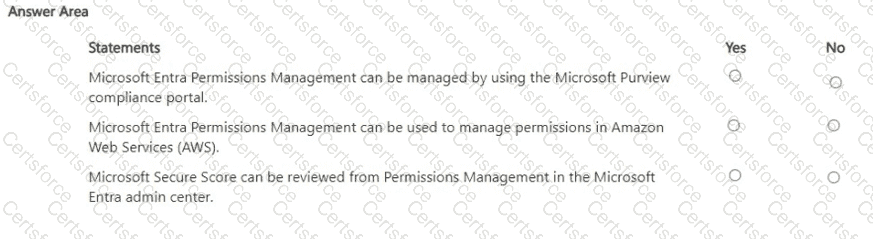
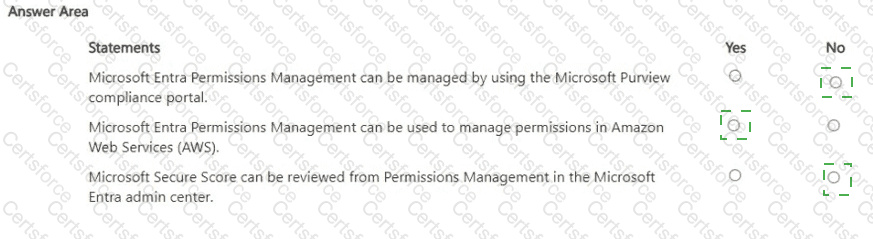
Microsoft Entra Permissions Management is Microsoft’s cloud infrastructure entitlement management (CIEM) solution delivered in the Microsoft Entra admin center, not in the Microsoft Purview compliance portal. Microsoft guidance describes it as a CIEM service that provides “centralized visibility, right-sizing, and governance of permissions across clouds” and is accessed and administered from the Entra portal under Permissions Management. The Purview compliance portal is used for compliance solutions such as Compliance Manager, Information Protection, DLP, eDiscovery, and Insider Risk—not CIEM—so statement 1 is No.
Permissions Management supports multicloud environments. Microsoft documentation states that it “discovers, monitors, and manages permissions for identities and resources across Microsoft Azure, Amazon Web Services (AWS), and Google Cloud Platform (GCP).” It calculates a Permission Creep Index (PCI), surfaces excessive permissions, and recommends remediation across these clouds; therefore, using it to manage permissions in AWS is supported—statement 2 is Yes.
Regarding secure scores: Permissions Management focuses on entitlements (e.g., effective permissions, PCI, right-sizing actions). Microsoft Secure Score (and Identity Secure Score) are separate posture metrics exposed in Microsoft 365 Defender and Microsoft Entra ID, respectively. The Permissions Management blade does not present Microsoft Secure Score; instead, it shows CIEM-specific insights and PCI. Consequently, the claim that Secure Score can be reviewed from Permissions Management in the Entra admin center is No.


Submit