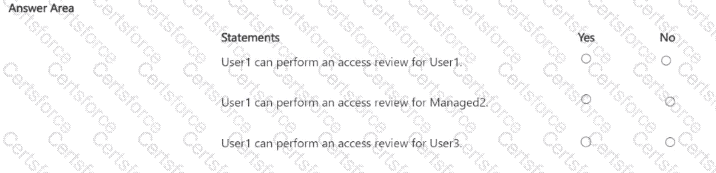
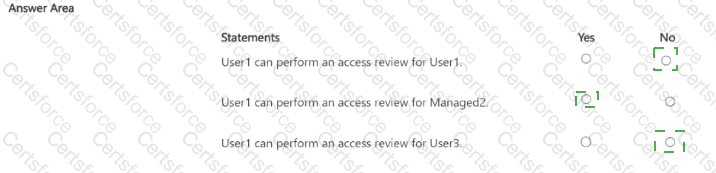
User1 can perform an access review for User1: No
User1 can perform an access review for Managed2: Yes
User1 can perform an access review for User3: Yes
In this scenario, an access review named Review1 has been configured for Group1, with the following conditions:
Review scope: Teams + Groups
Group: Group1
Scope: All users
Reviewers: Group owner(s)
Fallback reviewers: None
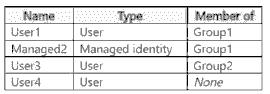
From the configuration, the reviewers of the access review are the owners of Group1 — namely User1 and User4. Therefore, both of these users are authorized to review all members of Group1.
Group1 includes the following members:
User1 (User, also owner)
Managed2 (Managed identity)
Group2 (which includes User3)
Since the scope is set to All users, it includes both internal and external members. However, the SC-300 materials emphasize that reviewers cannot review their own access; Microsoft Learn states:
“Reviewers cannot approve or deny their own access in an access review, even if they are members of the group under review.”
Therefore:
User1 cannot review themselves → No
User1 can review Managed2 → Yes, because Managed2 is a member of Group1
User1 can review User3 → Yes, because User3 is a member of Group2, and Group2 is itself a member of Group1, meaning User3’s membership is indirectly part of the review scope
This behavior aligns with SC-300 guidance that nested group members are included when the review scope is “All users,” and reviewers (owners) can assess all included members except themselves.


Submit