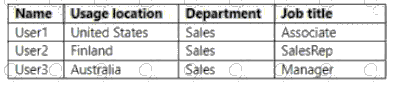
Dynamic Azure AD groups use membership rules written against user attributes (for example, user.department , user.jobTitle , user.country , user.usageLocation ). The SC-300 materials show operators such as -eq, -contains, -startsWith, and logical -and/-or to build precise targeting. In this scenario, the provided rule syntax evaluates users in the Sales department whose jobTitle contains “Sales” (for example, “SalesRep”). From the data: User1 has job title Associate (does not contain “Sales”); User2 has job title SalesRep (contains “Sales”); User3 has job title Manager (does not contain “Sales”). Because department for all three is Sales, the discriminating condition is the job title match. Therefore, only User2 satisfies the rule and will be added to the dynamic group. The SC-300 guide emphasizes validating rules with the “Preview membership results” tool to confirm which users are included before enforcing at scale.
Contribute your Thoughts:
Chosen Answer:
This is a voting comment (?). You can switch to a simple comment. It is better to Upvote an existing comment if you don't have anything to add.



Submit