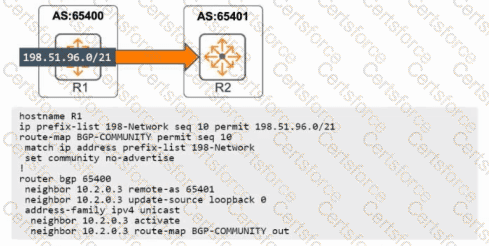
“For each BGP neighbor and address-family you can control the advertisement of community attributes using the send-community command. The options are standard, extended, and both. When both is configured, the neighbor is sent both the standard and extended community attributes with the NLRI updates.”
“BGP accepts community attributes received from a neighbor by default; the send-community setting governs outbound advertisement. The configuration does not require resetting the peering session.”
These extracts establish that adding send-community both under the IPv4 unicast address-family for neighbor 10.2.0.3 makes R1 include community attributes with its UPDATEs and that the choice both covers standard and extended communities. Because BGP already accepts communities on receive, this effectively enables the exchange of communities in both directions when the peer is similarly capable. This matches B (exchange with NLRI in and out) and D (standard and extended communities are included).
“The term type-1/type-2 is used in EVPN route types and is not the nomenclature for BGP communities. The send-community command does not reference EVPN route types; it controls standard/extended community attributes.”
Thus, A references the wrong concept.
“Changing send-community for a neighbor is applied dynamically in the address-family context and does not require tearing down the BGP session.”
Therefore, enabling send-community both will not “bounce” the peering.
References of HPE Aruba Networking Switching documents or Study Guide:
AOS-CX BGP Configuration Guide — “Neighbor policy controls per address-family: send-community {standard | extended | both}; communities accepted on receive by default; change does not reset the session.”
AOS-CX Route Policy and Attributes Reference — “Community attributes (standard and extended) and how they are attached to NLRI in UPDATE messages.”


Submit