The Guidewire Page Configuration Framework (PCF) follows a strict nesting hierarchy to ensure that the layout engine can correctly render widgets on the screen. According to the InsuranceSuite Developer Fundamentals curriculum, specifically the lesson on " Container Widget Usage, " developers must understand the parent-child relationships required for different layout styles.
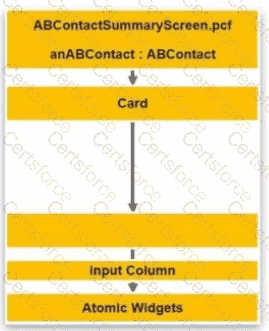
A Card widget is a component of a CardViewPanel, used to create tabbed interfaces within a page. However, a Card itself cannot directly host an Input Column. Instead, a Card serves as a container for other panels. To display data fields in the standard column-based layout favored by InsuranceSuite, a DetailViewPanel (commonly referred to simply as a Detail View in the Studio palette) must be placed inside the Card.
The Detail View acts as the intermediate container that establishes the data context (the row or entity being edited) and provides the grid system necessary for the Input Column. The Input Column, in turn, allows developers to align fields vertically. Without the Detail View container, the PCF would be syntactically invalid because the layout engine requires the Detail View to manage the labels and input alignment for any child columns.
Option A is incorrect because a " PCF File " is the entire document, not a widget added to a tree. Option C (List View) is used for tabular data, not column-based input layouts. Option D (Input Set) is a grouping mechanism that sits inside or alongside an Input Column but cannot serve as the parent to one. Therefore, adding a Detail View (B) is the correct and necessary step to bridge the hierarchy between the Card and its Input Columns.


Submit