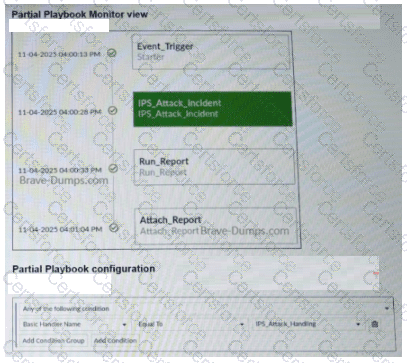
A partial view of the Playbook Monitor page and the corresponding playbook configuration are shown. Based on the monitor page and the configuration of the playbook, what has triggered the Run_Report task? (Choose one answer)
Based on the provided exhibits from the FortiAnalyzer playbook engine:
Playbook Trigger Condition : The Partial Playbook configuration exhibit shows that the playbook is set to trigger based on a condition where the Basic Handler Name is Equal To IPS_Attack_Handling.
Event vs. Log : In FortiAnalyzer, the field Basic Handler Name is a property of an Event record, indicating the specific Event Handler that generated it. A playbook configured with this condition is triggered by an Event , not directly by a raw log.
Playbook Execution Flow : The Partial Playbook Monitor view shows the execution sequence:
Event_Trigger (Starter) : This is the entry point of the playbook, which matches the condition defined in the configuration.
IPS_Attack_Incident : The first task executed after the trigger.
Run_Report : The task in question, which is executed as part of the automated workflow initiated by the starter.
Conclusion : Since the playbook ' s " Starter " is defined by the IPS_Attack_Handling handler name, an event produced by that handler is the root trigger for the entire playbook execution, including the Run_Report task.
Therefore, the Run_Report task was triggered (as part of the playbook) by an IPS_Attack_Handling event .
Contribute your Thoughts:
Chosen Answer:
This is a voting comment (?). You can switch to a simple comment. It is better to Upvote an existing comment if you don't have anything to add.


Submit