In FortiNAC-F,Security Triggersare used to identify specific security-related activities based on incoming data such as Syslog messages or SNMP traps from external security devices (like a FortiGate or an IDS). These triggers act as a filtering mechanism to determine if an incoming notification should be escalated from a standard system event to aSecurity Event.
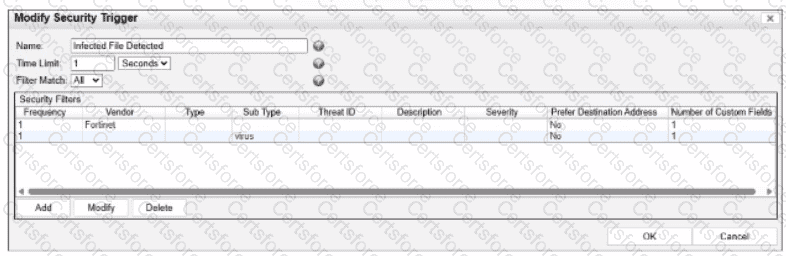
According to theFortiNAC-F Administrator Guideand relevant training materials for versions 7.2 and 7.4, theFilter Matchsetting is the critical logic gate for this process. As seen in the exhibit, the " Filter Match " configuration is set to " All " . This means that for the Security Trigger named " Infected File Detected " to " fire " and generate a Security Event or a subsequent Security Alarm,every single filterlisted in the Security Filters table must be satisfied simultaneously by the incoming data.
In the provided exhibit, there are two filters: one looking for the Vendor " Fortinet " and another looking for the Sub Type " virus " . If only one of these filters is satisfied (for example, a message from Fortinet that does not contain the " virus " subtype), the logic for the Security Trigger is not met. Consequently, FortiNAC-F does not escalate the notification. Instead, it processes theincoming data as aNormal Event, which is recorded in the Event Log but does not trigger the automated security response workflows associated with security alarms.
" The Filter Match option defines the logic used when multiple filters are defined. If ' All ' is selected, then all filter criteria must be met in order for the trigger to fire and aSecurity Eventto be generated. If the criteria are not met, the incoming data is processed as anormal event. If ' Any ' is selected, the trigger fires if at least one of the filters matches. " —FortiNAC-F Administration Guide: Security Triggers Section.


Submit