Exact Extract — Official Administration Guide
FortiOS 8.0.0 Administration Guide | Application override priority | p. 2609
“When creating an application sensor, you can define the applications that you want to control. You can add applications and filters using categories, application overrides, and/or filter overrides with designated actions (monitor, allow, block, or quarantine).”
Technical Deep Dive
1. Application and filter overrides...”
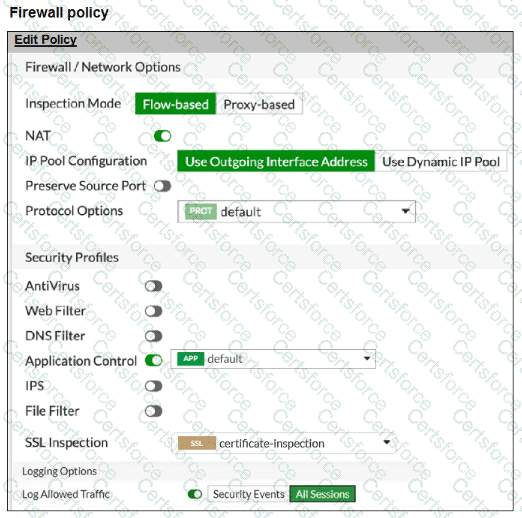
The problem is not flow-based mode and not the SSL profile. Your firewall policy already has certificate-inspection, and the documented FortiOS behavior explicitly says that application control for HTTPS traffic works with certificate inspection or deep inspection. So option B is unnecessary, and option A is unrelated.
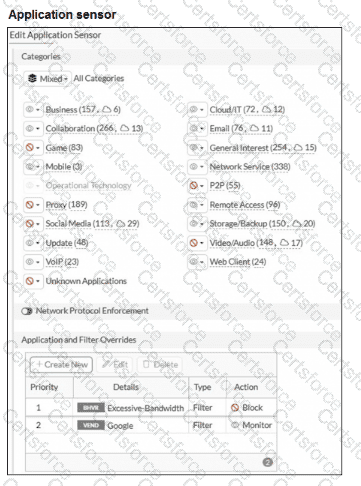
The real issue is the override order inside the application sensor:
Priority 1: Filter = Excessive-Bandwidth, Action = Block
Priority 2: Vendor = Google, Action = Monitor
FortiGate evaluates overrides from top to bottom and applies the first match. Many Google applications match the Excessive-Bandwidth filter, so they are blocked before the later Google/Monitor override is ever reached. That is why Google apps fail while www.fortinet.com still works.
So the correct fix is to move the Google override above the Excessive-Bandwidth filter, making Google the first match.
A representative CLI-style logic would be:
config application list
set vendor " Google "
set action monitor
set filter " Excessive-Bandwidth "
set action block
That preserves the bandwidth block for other apps while allowing Google applications to match the higher-priority override first.
FortiOS 8.0 verification note: The Google Monitor filter should be moved ahead of the broader block filter.


Submit