Exact Extract — Official Administration Guide
FortiOS 8.0.0 Administration Guide | URL exceptions | p. 2497
“The exempt URL filter action can be configured to bypass all or certain scanning and filtering operations. This setting can only be configured in the CLI.”
Technical Deep Dive
“In FortiOS, there are three main components of web filtering:
• Web content filtering...
• URL filtering: uses URLs and URL patterns to block or exempt web pages from specific sources...
• FortiGuard Web Filtering service...”
The local static URL filter
FortiGuard category filtering...”
The correct answers are A and B.
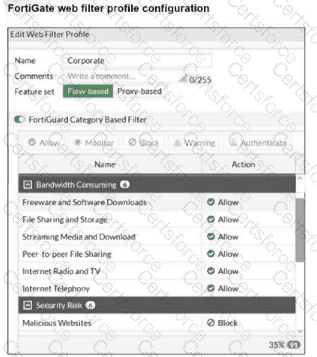
A is correct because a static URL filter gives per-URL granularity. Since the category Freeware and Software Downloads is currently allowed in the profile, adding a local static URL filter entry for download.com with Block lets FortiGate deny only that site while continuing to allow the rest of the category. This also aligns with the documented inspection order, where the local static URL filter is checked before FortiGuard category filtering.
B is also correct because a web rating override can reclassify a specific exceptional URL. If download.com is re-rated into a blocked category such as Malicious Websites, it will be blocked by the profile while other sites in Freeware and Software Downloads remain allowed.
Why the others are wrong:
C is not the intended web-filter solution. A firewall policy with an FQDN object operates at policy/routing resolution level, not as a category-aware web filtering exception.
D is wrong because changing the whole category to Warning affects all sites in that category, not just download.com.
FortiOS 8.0 verification note: Blocking a single URL is preferable to changing the action on an entire broad web category.


Submit