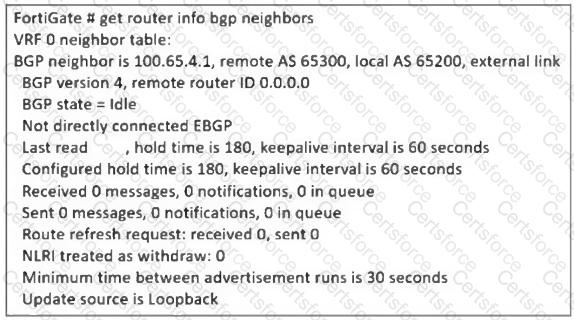
From the BGP neighbor status output, the key issue is that BGP is stuck in the " Idle " state, meaning the FortiGate is unable to establish a BGP session with its peer 100.65.4.1 (Remote AS 65300).
The output also shows:
● " Not directly connected EBGP " → This means the BGP peer is not on the same subnet, requiring multihop BGP.
● " Update source is Loopback " → Since a loopback interface is used, FortiGate must be configured to allow BGP neighbors over multiple hops.
To resolve this issue, the administrator must enable ebgp-enforce-multihop, which allows BGP sessions to be established even when the neighbors are not directly connected.
Contribute your Thoughts:
Chosen Answer:
This is a voting comment (?). You can switch to a simple comment. It is better to Upvote an existing comment if you don't have anything to add.


Submit