Based on theFortiClient EMS 7.2/7.4 Study Guidesand the visual evidence provided in the exhibit, here is the verified breakdown of why theZTNA Serial Numberis showing asDisabled:
1. Analysis of the Exhibit
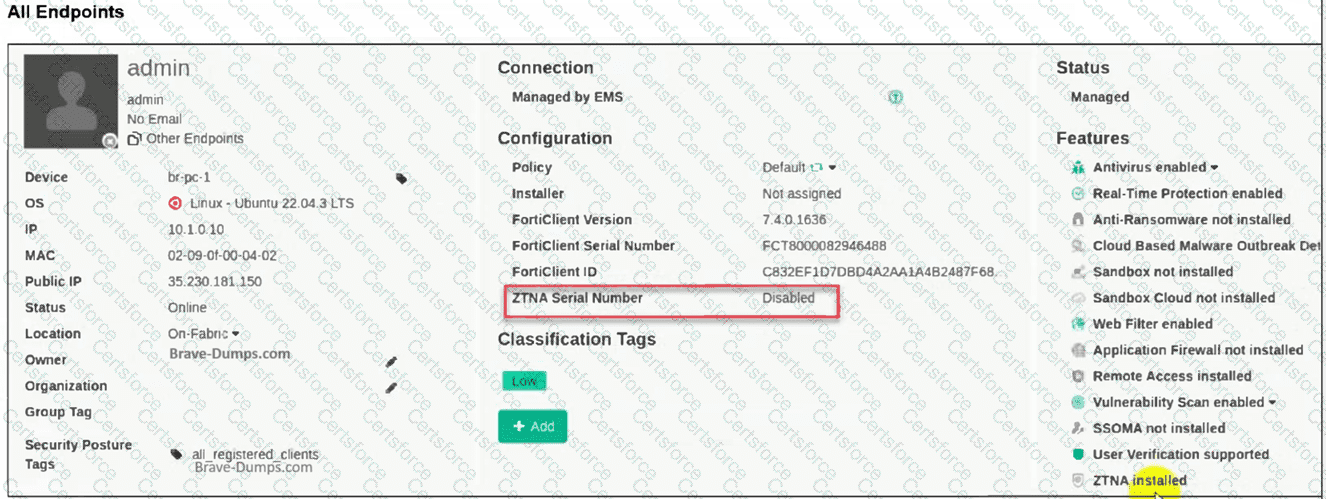
Operating System:The endpoint is runningLinux (Ubuntu 22.04.3 LTS).
Connection Status:The endpoint status isOnlineandManaged by EMS. This immediately eliminatesOption C, as the device is actively communicating with the EMS server.
Features List:At the bottom right of the "Features" column, it explicitly states"ZTNA installed". This eliminatesOption A, confirming the software component is present on the endpoint.
ZTNA Serial Number Field:The field is highlighted in red and shows"Disabled".
2. Identifying the Root Cause (Option B)
In the FortiClient EMS curriculum regardingZTNA (Zero Trust Network Access), the ZTNA Serial Number (also known as the ZTNA Tagging or Client Certificate UID) is generated and activated based on the assignedEndpoint Profile.
Profile Dependency:For FortiClient to generate a ZTNA serial number/certificate and participate in ZTNA, the administrator must enable and configure theZTNA Destinations(or ZTNA Connection) profile within the EMS.
Disabled State:If theZTNA Destinationsfeature is disabled in the profile assigned to that specific endpoint (or if the endpoint is assigned the "Default" profile where ZTNA is not configured), the "ZTNA Serial Number" status on the EMS dashboard will reflect asDisabled.
Linux Specifics:In FortiClient for Linux, ZTNA support is available but requires the profile to be explicitly pushed and active. If the profile is toggled off in the EMS GUI underEndpoint Profiles > ZTNA Destinations, the serial number functionality is suspended.
3. Why Other Options are Incorrect
A. The ZTNA feature is not installed:The exhibit clearly shows "ZTNA installed" under the Features list.
C. FortiClient disconnected from EMS:The exhibit shows the status as "Online" and "Managed by EMS" with a green checkmark.
D. The ZTNA certificate has been revoked:If a certificate is revoked, the status typically shows as "Revoked" or "Expired," or the serial number would still be present but marked as untrusted. A "Disabled" state indicates the feature itself is turned off at the policy/profile level.


Submit