This issue is best analyzed using a layered troubleshooting approach, as recommended in the Troubleshooting domain of CompTIA Linux+ V8. The reported symptom is intermittent or random disconnections from an NFS share, which commonly indicates a network reliability issue rather than a configuration or filesystem problem.
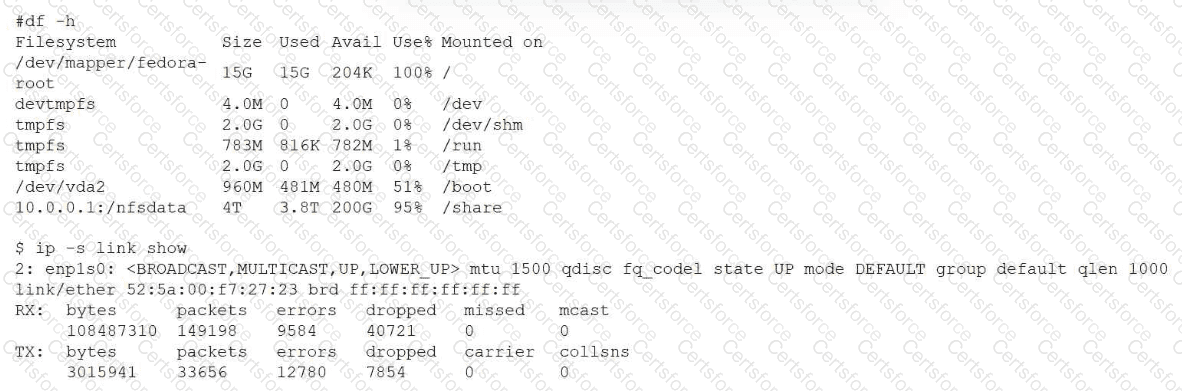
The most critical evidence comes from the output of ip -s link show. The network interface enp1s0 is reporting significant numbers of errors and dropped packets on both the receive (RX) and transmit (TX) paths. High packet loss at the network interface level directly affects protocols like NFS, which rely on stable, continuous TCP/IP communication. When packets are dropped or corrupted, NFS clients may experience timeouts, retransmissions, and apparent disconnections.
Although the df -h output shows that the NFS filesystem is 95% full, this alone does not typically cause random disconnections. A nearly full filesystem may lead to write failures or performance degradation, but it does not explain intermittent connectivity loss. Linux+ V8 documentation notes that filesystem capacity issues usually present as I/O errors, not transport-layer disconnects.
Options A and B can also be ruled out. If the mount point or IP address were incorrect, the NFS share would fail consistently rather than intermittently. The fact that the share is mounted and accessible confirms that the mount configuration and IP addressing are correct.
Linux+ V8 emphasizes that NFS performance and reliability are highly sensitive to network quality. Packet errors, drops, faulty NICs, cabling issues, duplex mismatches, or driver problems commonly result in unstable NFS behavior.
Therefore, the best explanation for the reported random disconnections is D. The interface is reporting a high number of errors and dropped packets.


Submit