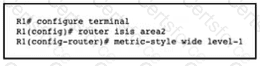
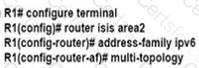
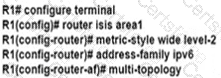
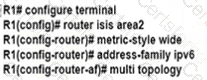
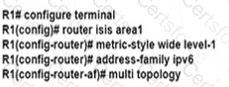
To configure multi-topology IS-IS for IPv6, the router must be configured with the ipv6 router isis command under the interface configuration mode. This command enables IS-IS for IPv6 on the interface. The ipv6 router isis command is used to enable IS-IS for IPv6 on an interface. The multi-topology keyword specifies that the interface will participate in multiple topologies. The level-1 and level-2 keywords specify the IS-IS levels for which the interface will participate. In this case, we want the interface to participate in both Level 1 and Level 2 topologies, so we use both keywords.
Contribute your Thoughts:
Chosen Answer:
This is a voting comment (?). You can switch to a simple comment. It is better to Upvote an existing comment if you don't have anything to add.


Submit