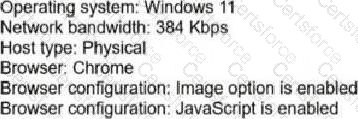
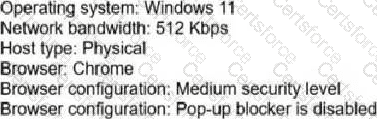
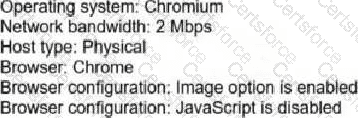
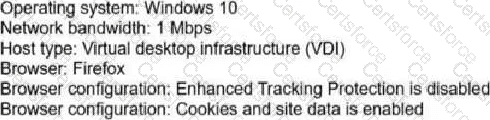
Option B is the only system profile that aligns with the Webex Contact Center Desktop WebRTC requirements shown in the exhibit. Cisco's desktop system requirements identify supported browsers and agent device models for calling, including Webex Calling desktop/app computer audio and WebRTC handling from Agent Desktop. A practical WebRTC station must have sufficient bandwidth, a supported operating system and browser, and browser settings that do not block required desktop behavior. Option A is weak because the 384 Kbps bandwidth value is below the practical WebRTC threshold shown by the comparison choices. Option C explicitly disables JavaScript, which prevents the browser-based desktop and WebRTC interaction logic from functioning properly. Option D uses a virtual desktop infrastructure condition, which is not the straightforward supported physical workstation profile presented by the question. Option B provides Windows 11, Chrome, physical host type, adequate bandwidth, a medium security level, and disabled pop-up blocking, making it the compliant choice. Reference: Cisco Help, System requirements for Webex Contact Center Desktop; Set up voice channels for Webex Contact Center.
Contribute your Thoughts:
Chosen Answer:
This is a voting comment (?). You can switch to a simple comment. It is better to Upvote an existing comment if you don't have anything to add.


Submit