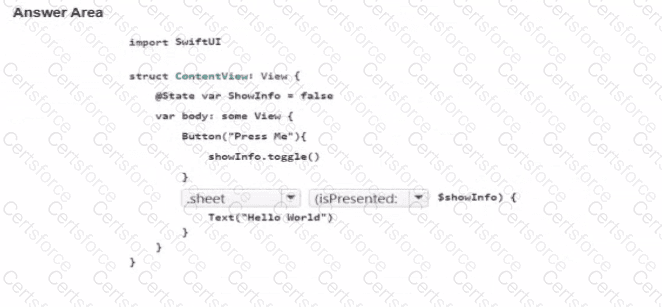
This question belongs to View Building with SwiftUI , specifically the domain on creating a multi-view app with navigation stacks, links, and sheets .
To present a modal view in SwiftUI when a Boolean state changes, the correct modifier is .sheet . The matching sheet API for a Boolean binding is:
sheet(isPresented: $showInfo) {
// modal content
}
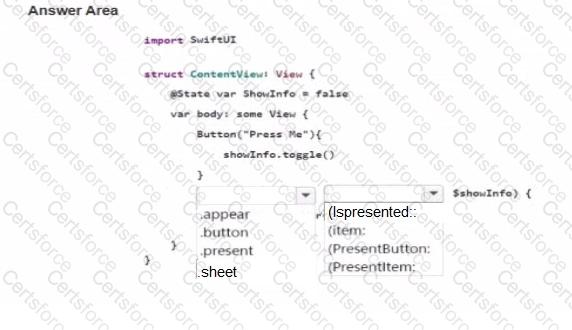
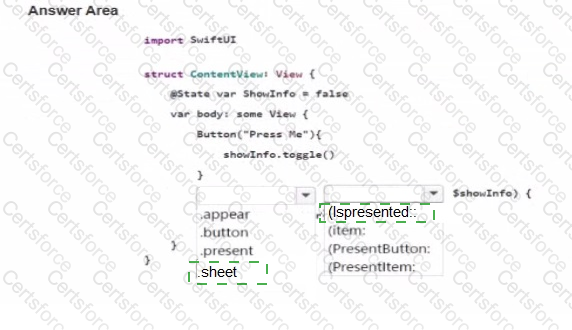
So the first blank must be .sheet , and the second blank must be (isPresented: .
The logic works like this:
@State stores the local Boolean that controls presentation.
Pressing the button calls showInfo.toggle(), changing the value from false to true.
When that Boolean becomes true, the .sheet(isPresented:) modifier presents the modal view.
When the modal is dismissed, SwiftUI updates the Boolean back as needed.
There is also a typing issue in the screenshot: the state variable appears as ShowInfo, while the button and binding use showInfo. Swift is case-sensitive, so those names must match. The corrected code should use the same identifier consistently, such as:
@State var showInfo = false
Therefore, the correct dropdown selections are:
sheet
(isPresented:


Submit